March 15, 2026
AI Product Photo Transformations: Real Before and After Examples
Product photography makes or breaks online sales. Shoppers decide in seconds whether a listing looks trustworthy, and the single biggest factor is image quality. But hiring a photographer, renting a studio, and styling a shoot costs hundreds per product — thousands if you're launching a full catalog.
That's the problem Flyshot solves. Upload a product photo taken on your phone, and the AI handles background removal, scene generation, and lighting — producing commercial-grade imagery in under a minute. Below are five real transformations across different product categories, each showing exactly what changes and why it matters.
Beauty & Skincare: From Bathroom Counter to Editorial Spread
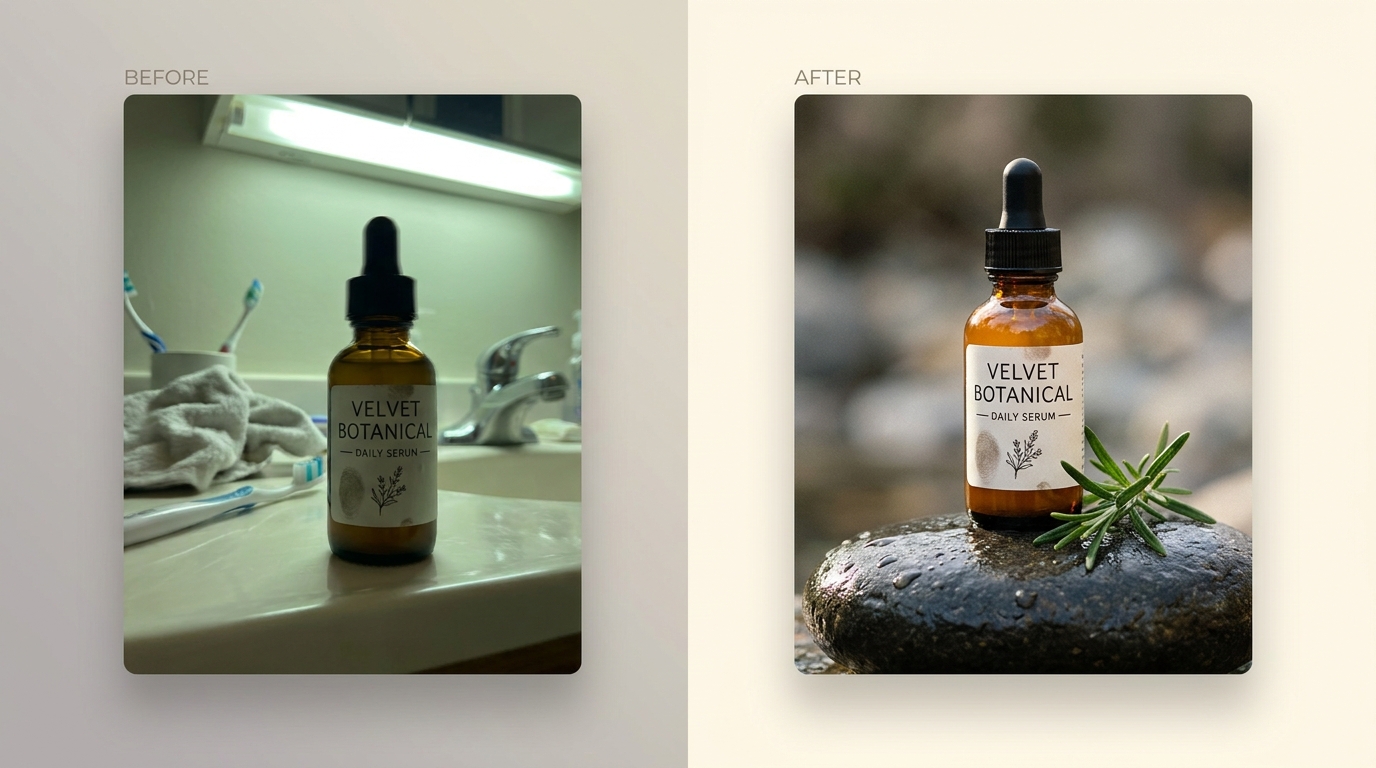
The before is immediately familiar: a serum bottle on a bathroom counter, surrounded by tile grout, ambient clutter, and flat overhead lighting. The product is fine — label legible, bottle clean — but the environment undermines any sense of quality.
The after tells a different story. The bottle sits on natural stone, flanked by fresh rosemary sprigs. Warm, directional light catches the glass and creates a soft reflection beneath. The palette shifts from sterile bathroom blues to earthy greens and warm neutrals — tones that signal "natural" and "premium" to a skincare buyer.
The scene reinforces the product's brand identity. A botanical skincare line should appear alongside natural elements. Flyshot's style presets handle this automatically, matching composition to product category. The result is the kind of image you'd find on a beauty brand's homepage, not a listing thrown together in five minutes.
Leather Goods: From Messy Desk to Café Editorial
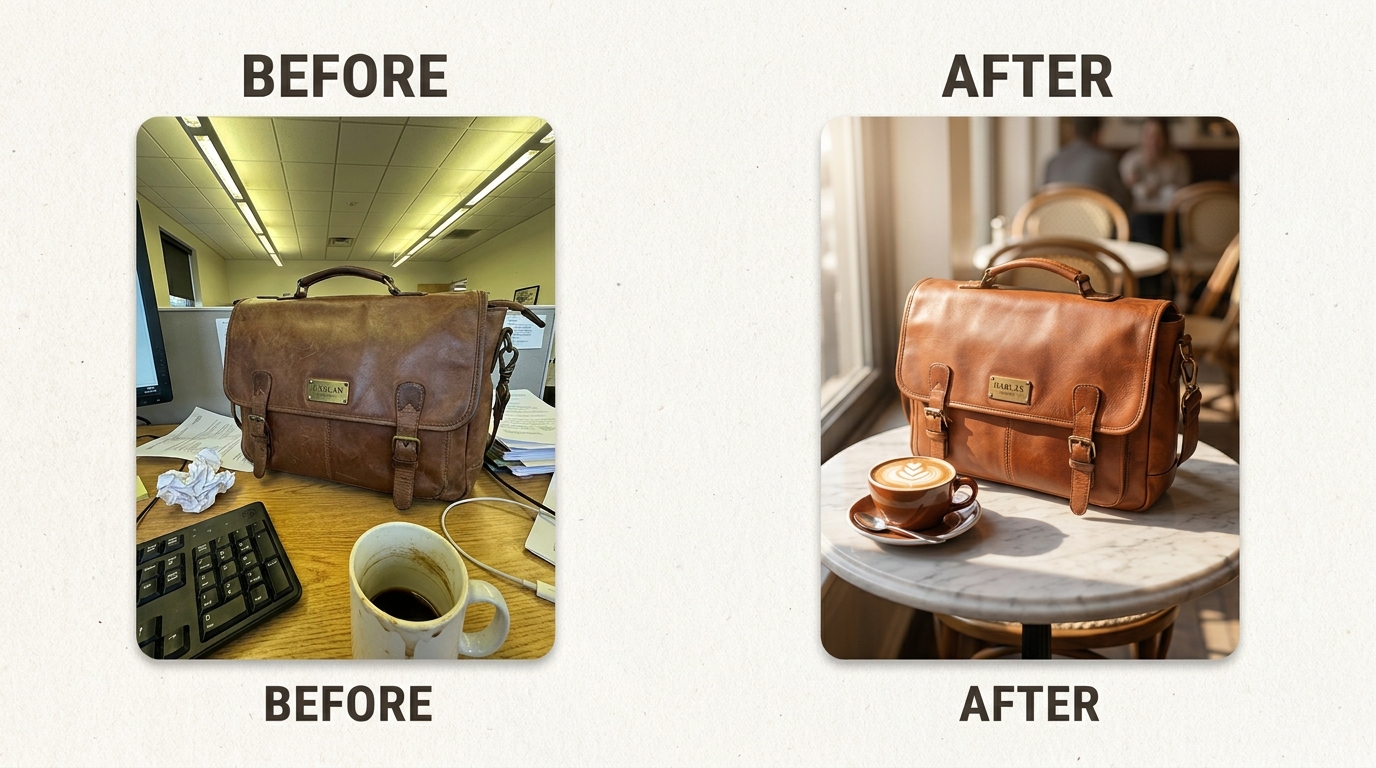
A leather briefcase on a messy office desk. Papers, cables, a monitor edge creeping into frame. The leather's texture and color are lost in flat fluorescent lighting. It reads as "someone's work bag" rather than "a product worth buying."
In the transformed version, the briefcase sits in an elegant café setting — warm wood tones, soft ambient light, a composition that gives the product breathing room. The leather grain is visible and rich. The brass hardware catches a highlight. The scene suggests the kind of person who carries this bag.
Context is everything for leather goods. A briefcase on a desk is forgettable. A briefcase in a setting that evokes a lifestyle is aspirational. The AI builds a complete environment with coherent lighting, depth of field, and color grading — the product stays the focal point while the scene does the storytelling.
Leather Accessories: One Photo, Four Lifestyle Scenes
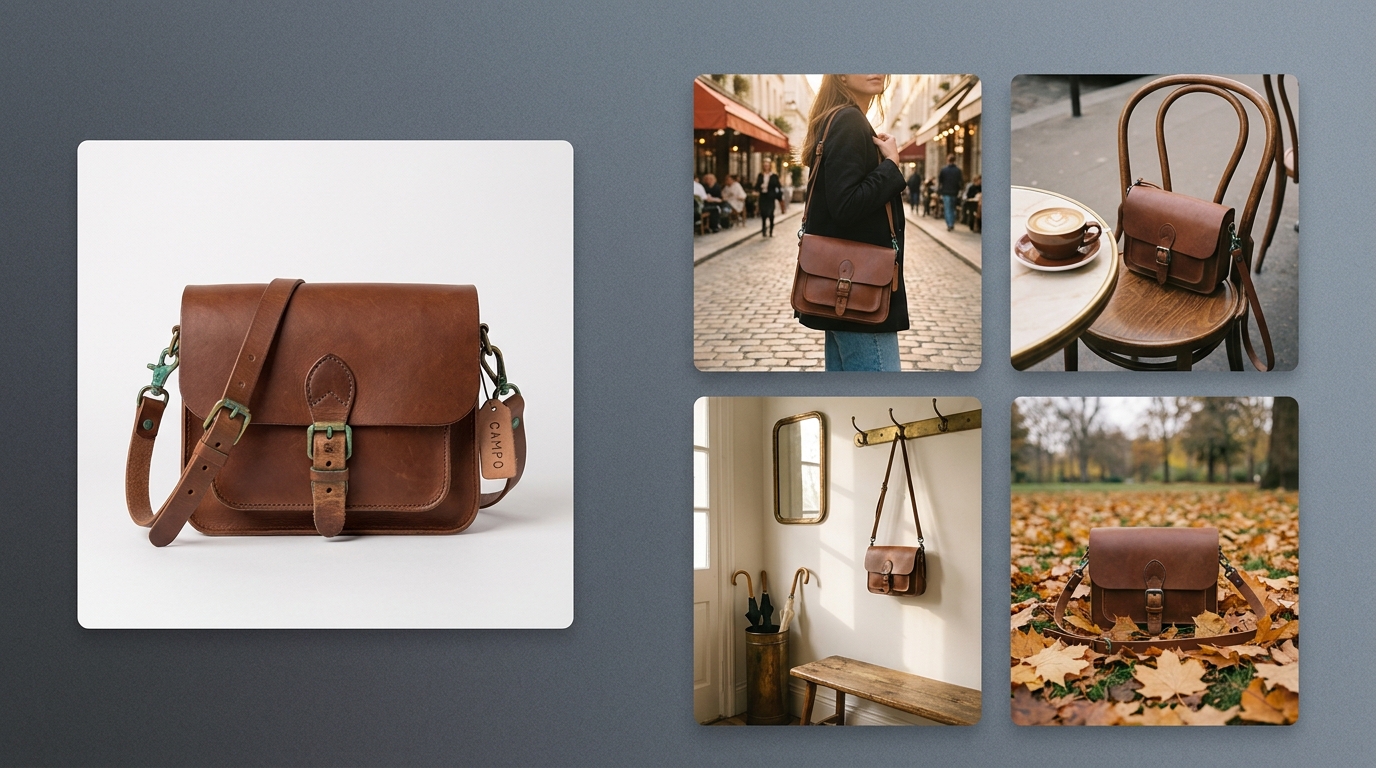
This example demonstrates a different capability. From a single photo on a plain white background, Flyshot's AI scene generation produced four distinct lifestyle compositions: the satchel on an urban street, at a café table, in a home entryway, and on an autumn park path.
Each scene targets a different buyer mindset. The street scene says "daily carry." The café says "professional but relaxed." The entryway says "this fits your life at home." The park says "weekend adventures." One product photo becomes a full visual campaign.
For sellers listing across multiple platforms, this variety is critical. Shooting four lifestyle scenes traditionally means four setups, four locations, and a full day of work. Here it takes one upload. Flyshot's detail preservation ensures the leather texture, stitching, and hardware remain accurate across every generated scene.
Fashion Accessories: From Single Upload to Full Catalog
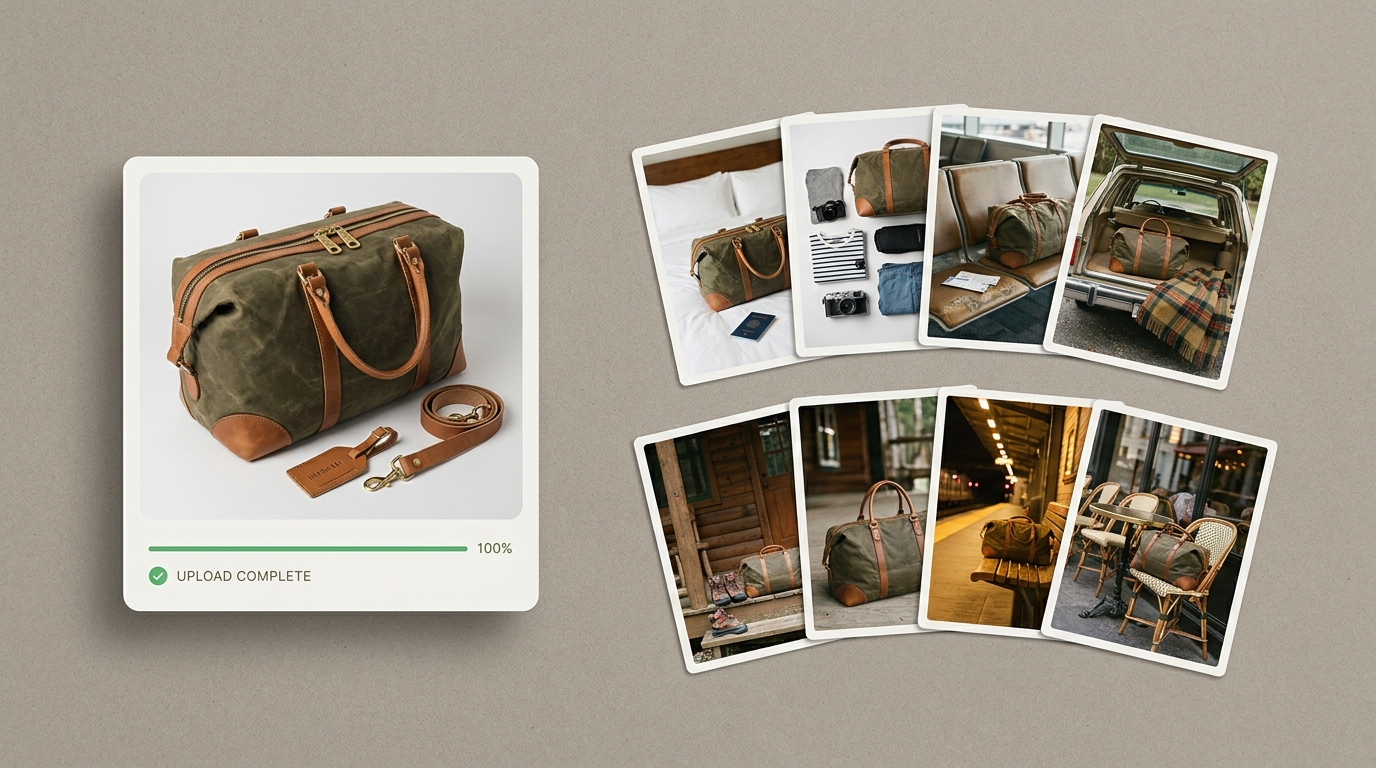
Scaling product photography is where most small brands hit a wall. One hero image per product is manageable. A full catalog with multiple lifestyle contexts per SKU? That's a production budget most sellers don't have.
This duffle bag started as a single upload. Flyshot generated six scene variations — different environments, lighting moods, and compositions. Some are clean and minimal for marketplace listings. Others are rich lifestyle scenes for social media or brand pages.
Consistency matters as much as variety. Across all six outputs, the bag's proportions, color, and material texture remain faithful to the original. The AI works from the actual photo, preserving every detail while building the world around it. For a brand launching dozens of products, this turns weeks of photography into an afternoon.
Jewelry: From Flat Lay to On-Model Editorial
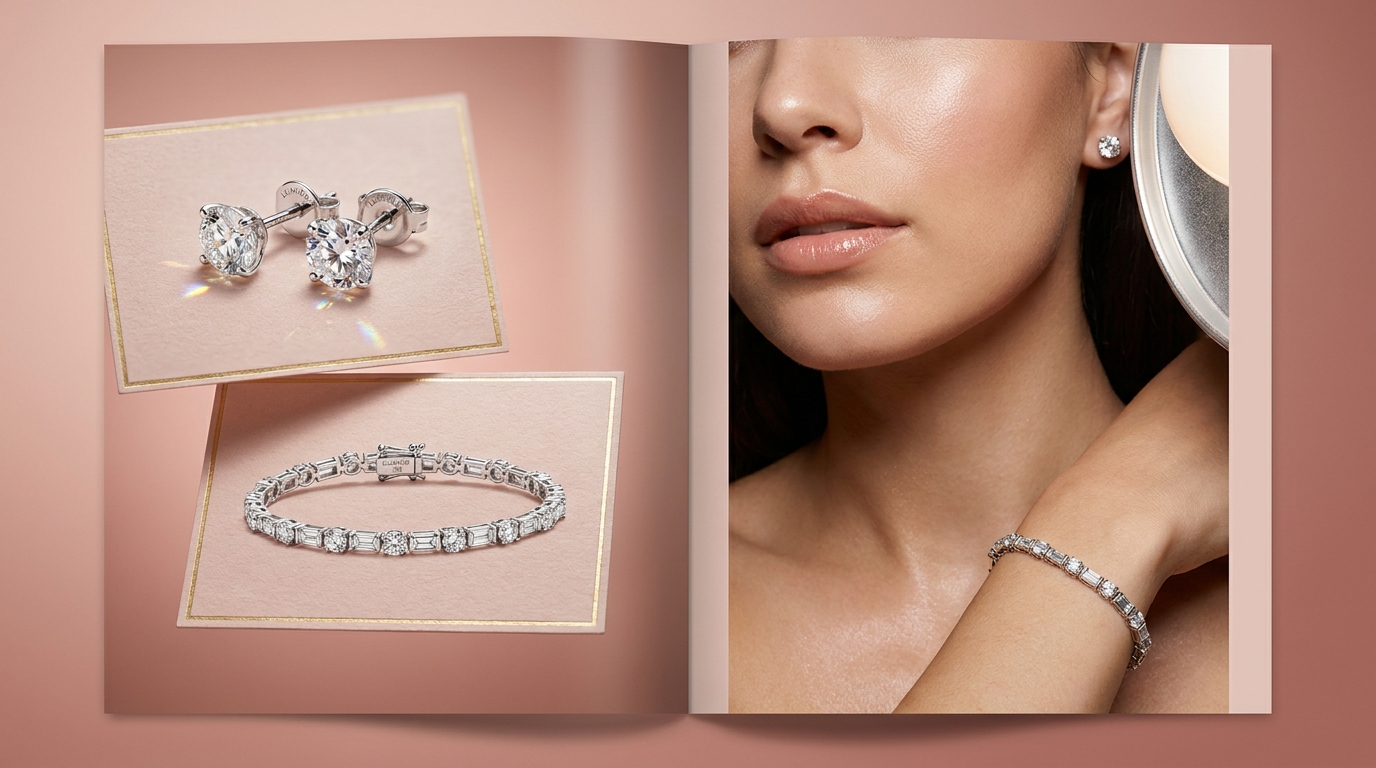
Jewelry is one of the hardest categories to photograph well. Small products, reflective surfaces, and the need to convey sparkle and dimension in a flat image. The before here is a standard flat lay — the pieces arranged on a surface, shot from above. It's clean enough for identification, but it doesn't sell the experience of wearing the jewelry.
The after places the same pieces on a model in an editorial context. Now the diamonds catch light at natural angles. The scale is immediately clear. The buyer can picture themselves wearing it — which is the entire point of on-model photography.
For jewelry sellers, this transformation addresses the biggest conversion barrier: buyers can't try the product on. A flat lay tells them what the piece looks like. An on-model shot tells them how it feels to wear it. That emotional gap is where purchase decisions happen, and closing it without hiring a model and a photographer is a meaningful advantage.
What Makes These Transformations Work
Every example above follows the same pipeline. First, background removal isolates the product from its original environment — no matter how cluttered or poorly lit. Then AI scene generation builds a new environment tailored to the product category: natural elements for beauty, warm interiors for leather, editorial lighting for jewelry.
The critical detail is that the product stays untouched. Flyshot alters everything around it — context, lighting, composition — while preserving texture, color, shape, and proportions from the original upload. Those three elements are what separate a phone snapshot from a professional product photo.
The input doesn't need to be perfect. A sharp, well-lit photo from a phone camera is enough. A window and a clean surface will get you there.
If you want to see what your own products look like after transformation, try Flyshot free — new accounts start with 25 credits, enough to test several products at full quality.