April 22, 2026
How to Build a Complete Product Catalog From a Single Photo
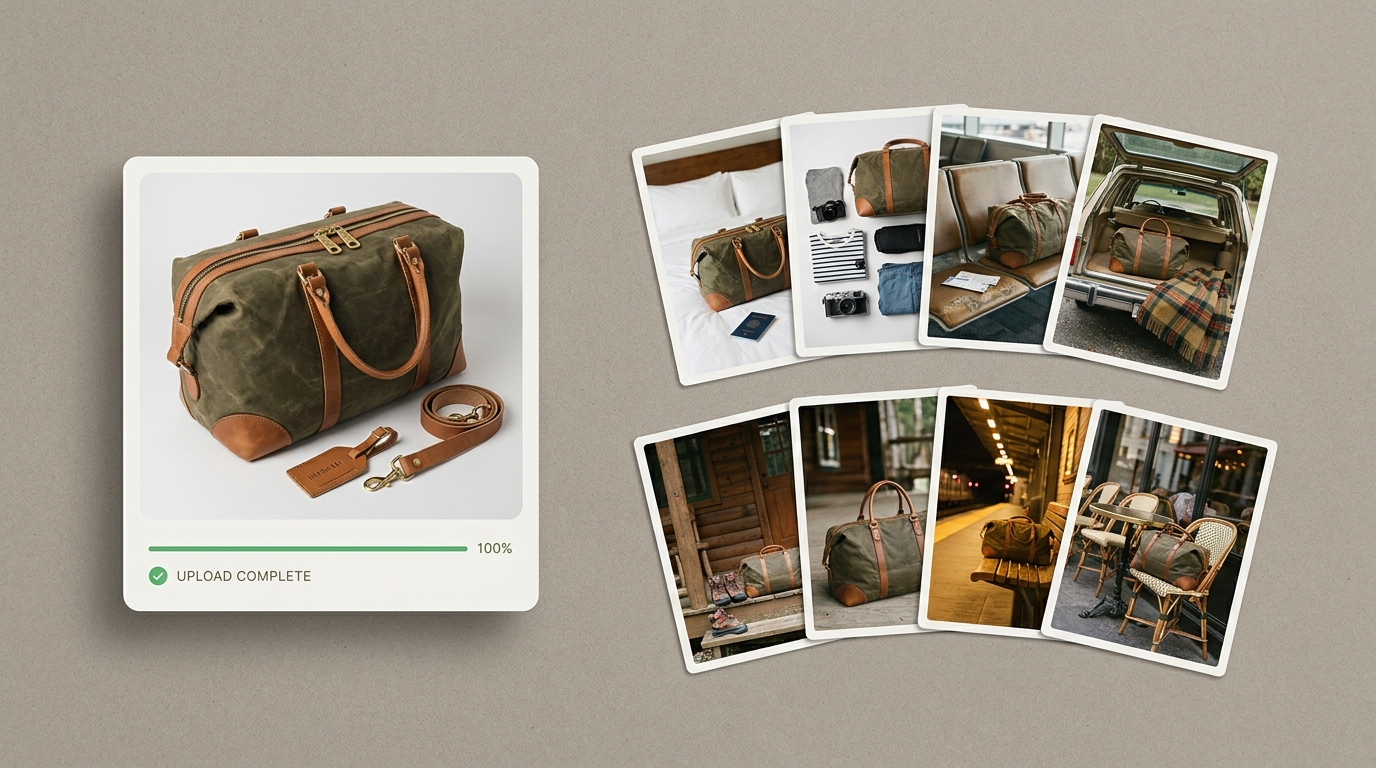
You have one good photo of your product. Maybe you shot it on your kitchen table with decent lighting, or maybe you paid a photographer for a single clean shot. Either way, you have one image — and you need a dozen. Your Shopify store needs a hero. Your Amazon listing needs a white background. Your Instagram needs lifestyle shots. Your email campaigns need something seasonal. Every channel expects something different.
This is the core tension of product catalog photography for small brands: every sales channel demands its own visual language, but producing that variety through traditional photography is brutally expensive. With the right approach — and some help from AI — a single product photo can become the foundation for an entire visual catalog.
Why One Photo Per Product Isn't Enough
Different platforms have different expectations. Amazon requires a white background main image. Shopify product pages convert best with a mix of clean studio shots and styled scenes. Social media rewards aspirational, editorial-quality lifestyle product photography that tells a story. An email campaign promoting a seasonal sale needs visuals that feel timely, not the same hero shot you've been using since launch.
Beyond platform requirements, product photo variations answer buyer questions without words. A duffle bag on a hotel bed communicates "travel." The same bag on a leather desk says "professional." In a car trunk with a plaid blanket, it says "weekend adventure." Each scene tells a different story about the same product, and each story resonates with a different buyer. The more contexts you show your product in, the wider the net you cast.
For brands with catalogs of 50 or 100+ products, the math gets overwhelming. If each product needs 5-8 ecommerce product images across channels, a 50-product catalog requires 250-400 finished photos. That's not a photo shoot — that's a production operation.
The Traditional Photography Bottleneck
A professional lifestyle product photography session — photographer, styled set, props, post-production — runs $1,500 to $3,000 per day in most cities. A good day might yield 20-30 final images across a handful of products. Need six different lifestyle scenes for a single product? That could eat an entire shoot day between set changes, prop styling, and lighting adjustments.
Even DIY approaches have limits. You can shoot clean product photos with a phone and natural light — our phone photography guide walks through how. But creating convincing lifestyle scenes at home requires props, surfaces, backdrops, and a decent eye for styling. Most sellers can pull off one or two good setups. Six distinct environments is a different skill set entirely.
So sellers compromise — same two images everywhere, and "fine" doesn't stop anyone mid-scroll.
Generating Scenes Instead of Shooting Them
The shift happening in ecommerce right now is about decoupling the product capture from the scene creation. Instead of a new physical setup for every variation, you capture the product once and generate the scenes digitally.
This is where AI scene generation fits in. The workflow is straightforward: upload your product photo, the AI removes the background, and then it generates a new environment around your product. A marble countertop. A rustic cabin porch. A sunlit Parisian café. Each scene is a distinct lifestyle image, produced from the same source photo.
The practical advantage isn't just cost — it's flexibility. Need a cozy autumn scene for a November email campaign? Generate it. Want to test whether your product converts better in a minimalist setting or a warm, textured one? Generate both and run the A/B test. You don't need to rebook a photographer. You need five minutes.
For sellers building out a product catalog, this changes the economics entirely. Instead of budgeting per-scene, you're budgeting per-product.
How to Get the Most From Your Source Photo
Whether you're using AI tools or working with a designer, the quality of your source photo determines everything downstream.
Lighting is everything. Soft, even lighting with minimal harsh shadows gives you the most flexibility. Natural window light on an overcast day is ideal. Avoid direct sunlight — it creates hard shadows that are difficult to work with in any post-production workflow.
Shoot on a clean, simple background. White or light gray is best. The goal is to make background removal as clean as possible. Busy backgrounds leave artifacts around edges, which degrade every downstream image.
Capture your product's best angle. Think about which perspective shows the most important features. For a bag, that's usually a three-quarter view showing the front, side, and top. This is the angle that will appear in every generated scene, so choose deliberately.
Shoot at full resolution. You'll be cropping, resizing, and placing this image into various compositions. Starting with more pixels gives you room to work.
Keep the product clean and styled. Iron out wrinkles, remove tags, wipe down surfaces. Every imperfection in your source photo will be faithfully reproduced in every variation.
Building a Consistent Catalog — and Putting It Into Practice
One underrated benefit of generating scenes from style presets is visual consistency. When you browse a well-designed ecommerce store, the product images feel like they belong together — same lighting temperature, similar composition, complementary color palettes. That cohesion signals professionalism and builds trust.
With traditional photography, maintaining consistency across dozens of products means meticulous attention to lighting setups and post-production color grading. One shoot in January and another in March can produce noticeably different results, even with the same photographer. When you apply the same style preset across your entire catalog, every product gets the same visual treatment — warm wood tones match from product to product, lighting direction stays consistent. This matters most on collection pages and Instagram grids. A visually cohesive catalog looks intentional. A mismatched one looks like you're figuring it out as you go.
Here's a practical workflow for building or refreshing your catalog:
- Capture each product once with clean lighting and a simple background. Batch your shooting — do all products in one session for consistency.
- Remove backgrounds to isolate each product cleanly.
- Choose 4-6 scene types that match your brand and cover your key channels — marketplace listings, lifestyle scenes for your website and social, and a seasonal option you can rotate.
- Generate variations for each product using those scene types. Apply the same scenes across your catalog for consistency.
- Export at the right sizes for each platform. Amazon wants square. Instagram wants square or 4:5. Your website hero might need wide.
This workflow scales whether you have 5 products or 500. The per-product effort stays roughly constant, which is the whole point. Flyshot lets you upload a product photo, remove the background, and generate styled scenes in minutes — it's a fast way to build out your first batch.
The sellers who win on multiple channels aren't the ones with the biggest photography budgets. They're the ones who figured out that one good photo, multiplied intelligently, beats a dozen mediocre ones shot in a rush.