Flyshot vs Photoroom: Which AI Photo Tool Is Right for You?
Both Flyshot and Photoroom help e-commerce sellers create professional product photos with AI, but they take fundamentally different approaches. Photoroom is a versatile photo editing app with a broad feature set — background removal, batch editing, collage tools, and a large template library — making it popular with casual sellers and social media creators. Flyshot is purpose-built for AI scene generation, focusing on editorial-quality output with up to 4K resolution and pixel-accurate product preservation. If you need a general-purpose photo editor with quick templates, Photoroom is strong. If you need studio-quality product scenes that look like they were shot by a professional photographer, Flyshot is built for that.
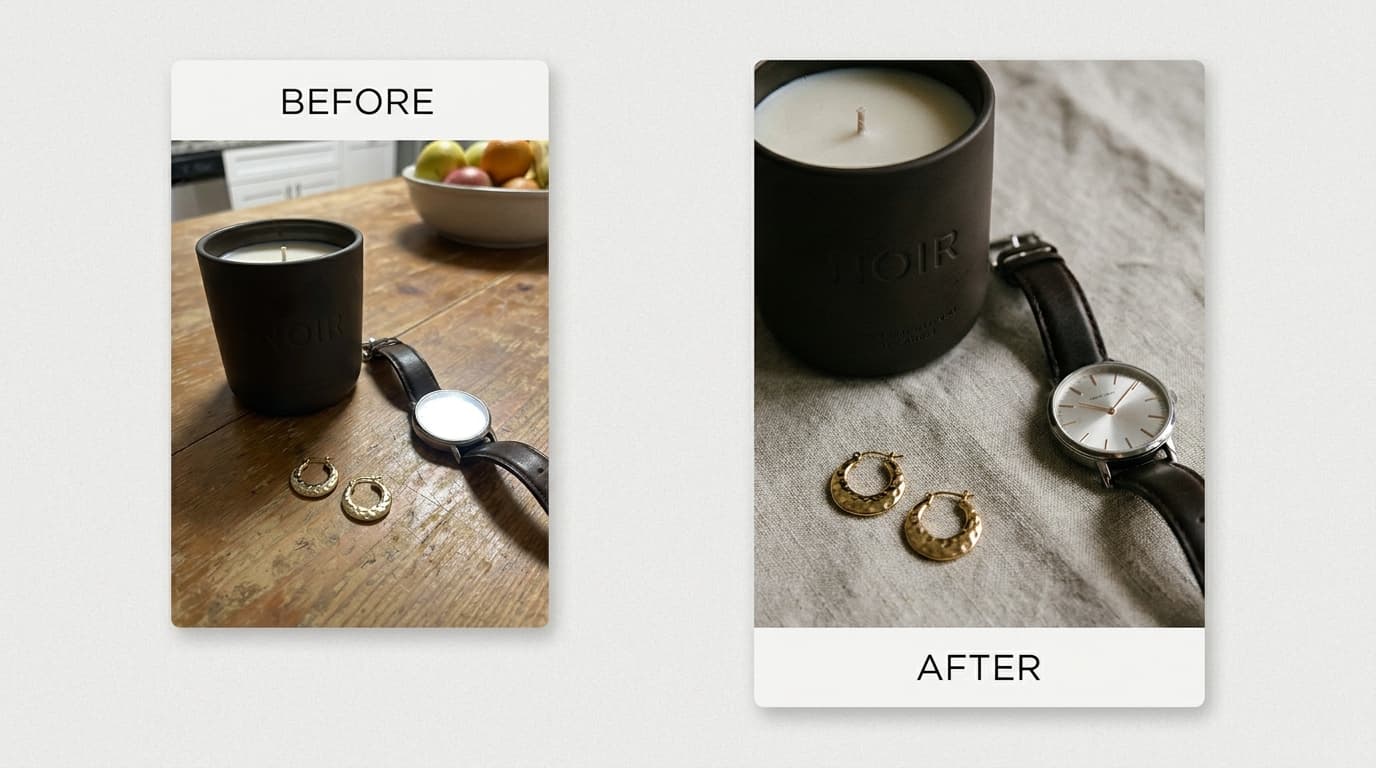
A Closer Look
Photoroom is ideal for sellers who need fast, clean product photos with minimal effort. Its template-driven workflow lets you pick a background, drop in your product, and export in seconds. It excels at high-volume, good-enough imagery — perfect for marketplace listings where speed matters more than artistic quality. Photoroom also offers a mobile app, making it convenient for sellers who photograph and list products on the go.
Flyshot takes a different approach entirely. Rather than offering templates, it uses AI to generate complete photographic scenes — with realistic lighting, shadows, reflections, and compositional depth. The result looks like an editorial photoshoot, not a product pasted onto a stock background. Flyshot also maintains a persistent product catalog, so you upload once and can generate unlimited scenes without re-uploading.
If you run a high-volume marketplace store and need hundreds of clean listings fast, Photoroom is likely the more practical choice. If you sell premium products where brand perception and visual quality directly impact conversion — fashion, jewelry, home décor, beauty — Flyshot delivers the kind of imagery that builds trust and justifies higher price points.
Feature Comparison
| Feature | Flyshot | Photoroom |
|---|---|---|
| AI Background Removal | Yes | Yes |
| AI Scene Generation | Yes | Limited |
| Style Presets | 18+ presets | Templates |
| Brand Catalog | Upload once, reuse forever | Re-upload each session |
| On-Model Quality | Realistic humans | Template-based |
| Product Preservation | Pixel-accurate | Standard |
| Output Style | Editorial/artistic | Clean/standard |
| Image Quality | Up to 4K | Up to 2K |
| Ease of Use | Upload and generate | Drag-and-drop editor |
| Output Formats | PNG, JPG | PNG, JPG, PDF |
| Custom Branding | Via style presets and prompts | Logo and text overlays |
| Mobile App | Web-based (mobile responsive) | iOS and Android apps |
| Free Tier | 25 credits on signup | Limited free edits per day |
| Customer Support | Email support | Email and in-app support |
| Learning Curve | Minimal — describe what you want | Minimal — template-based |
| Batch Processing | Coming soon | Yes |
| API Access | Coming soon | Yes |
Why Choose Flyshot
Editorial Quality, Not Generic AI
Flyshot uses a custom generation pipeline with intentional lighting, composition, and mood — producing results that look like they were shot by a professional photographer, not generated by a machine. This matters because premium-looking product photos directly increase click-through rates and conversions. Instead of flat, template-based backgrounds, you get scenes with depth, shadow play, and visual storytelling that elevate your brand.
Your Brand Catalog, Always Ready
Upload your products once and generate unlimited scenes forever — no re-uploading between sessions. Your entire product catalog stays organized and accessible, so you can create new seasonal campaigns or A/B test different scenes in minutes. This persistent catalog approach saves hours of repetitive work, especially for brands with large product lines that need frequent visual refreshes.
Realistic On-Model Photography
Flyshot generates models that look authentically human — natural poses, real skin texture, and believable styling. This is critical for fashion, accessories, and beauty brands where customers need to visualize how a product looks on a real person. Unlike template-based approaches that paste products onto stock model photos, Flyshot creates cohesive scenes where the model, product, and environment feel like a single photograph.
Pixel-Accurate Product Preservation
Every detail of your product is preserved exactly as it appears — colors, textures, labels, and fine details remain untouched. Many AI tools subtly alter product appearance during generation, introducing artifacts or color shifts that misrepresent your actual product. Flyshot treats your product image as sacred, compositing it with pixel-level accuracy so customers see exactly what they will receive.
Ready to try Flyshot?
Get 25 free credits and see the difference AI scene generation makes for your product photos.
Start Free