Flyshot vs Canva: AI Product Photography vs Design Platform
Canva is one of the most popular design platforms in the world, used by millions for everything from social media posts to presentations to product mockups. It offers a massive template library, drag-and-drop editing, and a broad set of design tools that go far beyond product photography. Flyshot is a specialized AI tool built exclusively for product photography — it generates photorealistic scenes with studio-quality lighting and composition. If you need a general design tool that also handles product images, Canva covers a lot of ground. If product photography is your primary need and quality is your priority, Flyshot is purpose-built for that job.
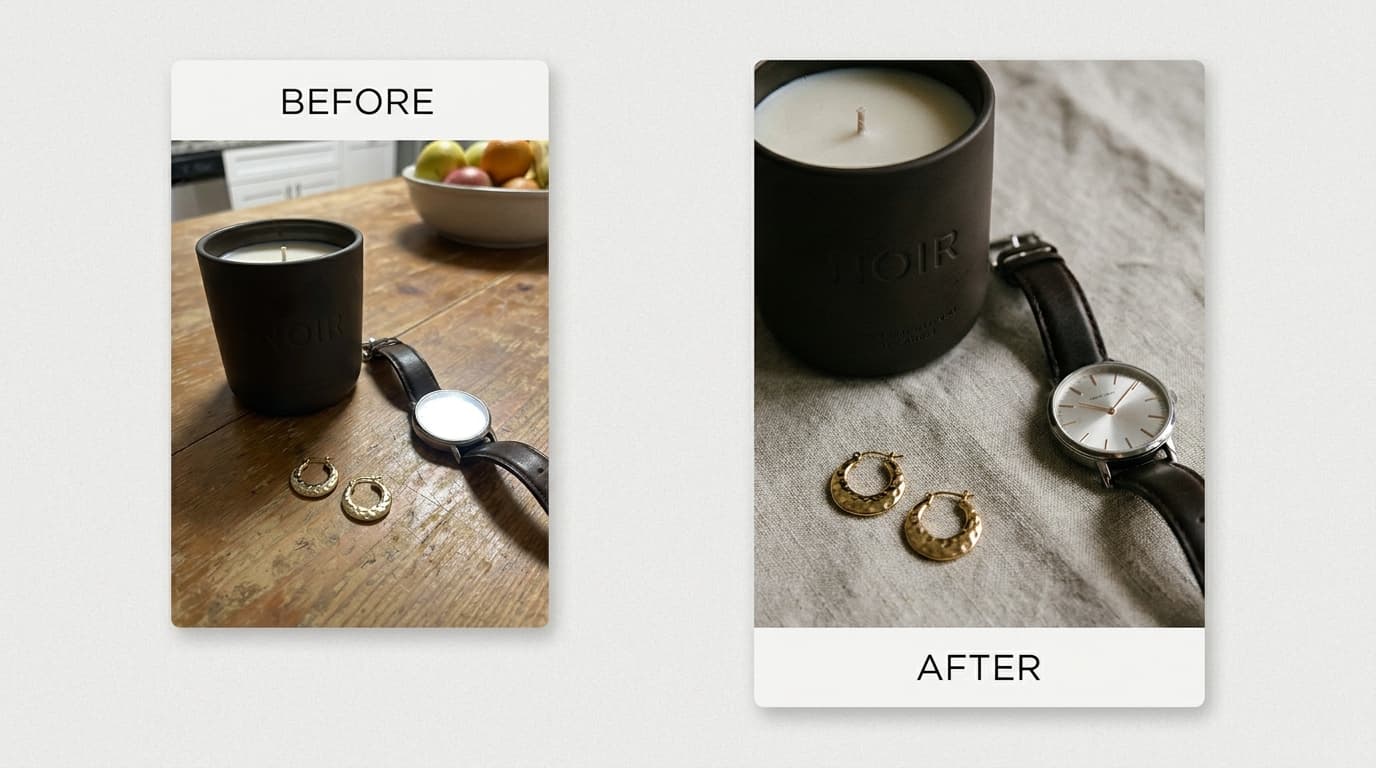
A Closer Look
Canva is the right choice for teams that need a single tool for all their visual content — social media graphics, presentations, flyers, and product images. Its strength is breadth: thousands of templates, a huge asset library, and collaborative editing make it a productivity powerhouse for marketing teams. For product photography specifically, Canva offers background removal and template-based mockups, but the results tend to look like designed graphics rather than photographs.
Flyshot approaches product imagery from the opposite direction. Instead of giving you a canvas to design on, it generates complete photographic scenes using AI. You describe the scene you want — or pick a style preset — and Flyshot produces an image that looks like it came from a professional photoshoot. There are no layers to arrange, no assets to position, and no design skills required.
If your team already uses Canva for broader marketing work and product photos are just one small part of your output, sticking with Canva makes sense. If product photography is a core part of your business and you want images that look genuinely photographic rather than designed, Flyshot delivers a level of realism that template-based tools cannot match.
Feature Comparison
| Feature | Flyshot | Canva |
|---|---|---|
| AI Background Removal | Yes | Yes |
| AI Scene Generation | Yes | No (template-based) |
| Style Presets | 18+ presets | Thousands of templates |
| Brand Catalog | Upload once, reuse forever | Brand Kit (paid plans) |
| On-Model Quality | Realistic humans | Stock photos only |
| Product Preservation | Pixel-accurate | Manual placement |
| Output Style | Editorial/photographic | Graphic design |
| Image Quality | Up to 4K | Varies by template |
| Ease of Use | Upload and generate | Drag-and-drop editor |
| Output Formats | PNG, JPG | PNG, JPG, PDF, SVG, MP4 |
| Custom Branding | Via style presets and prompts | Full Brand Kit with fonts, colors, logos |
| Mobile App | Web-based (mobile responsive) | iOS and Android apps |
| Free Tier | 25 credits on signup | Generous free plan with limits |
| Customer Support | Email support | Email, chat, and community |
| Learning Curve | Minimal — describe what you want | Low — familiar editor interface |
| Collaboration | Single-user | Real-time team collaboration |
| Use Cases | Product photography | All visual content types |
Why Choose Flyshot
Photographic Realism, Not Graphic Design
Canva produces designed graphics — products placed on colored backgrounds or inside template layouts. Flyshot generates actual photographic scenes with realistic lighting, shadows, and depth. For e-commerce, this distinction matters: customers trust photos more than graphics, and photorealistic imagery consistently outperforms template-based designs in conversion rate testing.
No Design Skills Required
While Canva is easy to use, it still requires you to make design decisions — choosing templates, positioning elements, adjusting layouts. Flyshot removes that entirely. You upload a product, describe the scene or pick a preset, and the AI handles composition, lighting, and styling. This means anyone on your team can produce professional product photos without design training.
Built for Product Photography
Canva is a general-purpose design tool that happens to support product mockups. Flyshot is built from the ground up for product photography — every feature, from the generation pipeline to the style presets to the product catalog, is optimized for creating compelling product imagery. This specialization means better results for the specific task of making products look their best.
Persistent Product Catalog
Flyshot maintains your entire product library with background-removed versions ready to go. When you want to create a new campaign or test a different visual style, your products are already prepared. In Canva, you would need to re-upload and re-edit product images each time, which adds friction when you are managing a large catalog.
Ready to try Flyshot?
Get 25 free credits and see the difference AI scene generation makes for your product photos.
Start Free