April 17, 2026
Jewelry Photography: From Flat Lay Product Shots to On-Model Editorial
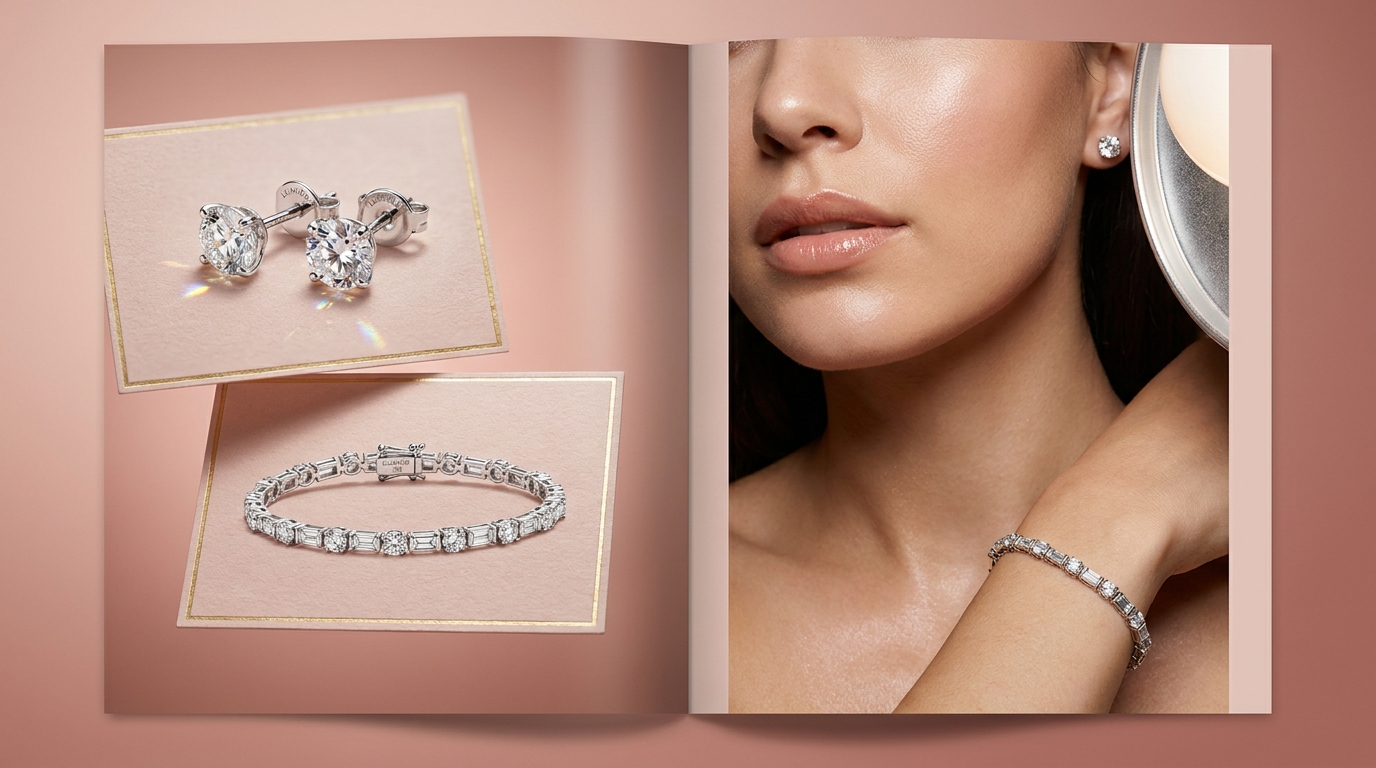
Every jewelry seller eventually hits the same wall. You've nailed the flat lay — your diamond studs sit perfectly on blush paper, your tennis bracelet catches the light just right, and the product shots look clean enough for any marketplace listing. But then you see a competitor's pieces on a person. An earring catching light against a jawline. A bracelet draped across a wrist with soft studio shadows. Suddenly your flat lays, no matter how polished, feel incomplete. The product is documented, but it isn't desired.
That tension between product documentation and aspiration is the central challenge of jewelry photography. You need both. Marketplaces want clean, isolated shots. Social media and your storefront want editorial warmth. And for most independent jewelers, producing both has meant either doubling the photography budget or choosing one and living with the tradeoff.
Why Jewelry Needs On-Model Shots More Than Almost Any Other Category
Jewelry has a scale problem no other product category shares quite as acutely. A ring is two centimeters across. Earrings are smaller. Even a statement necklace, photographed flat, gives the viewer no intuitive sense of how it looks when worn. Is that pendant delicate or chunky? Do those hoops sit close to the ear or swing wide? A flat lay can't answer these questions. An on-model photo answers them instantly.
There's also the aspiration factor. Jewelry is emotional commerce. People don't buy a tennis bracelet because they need one — they buy it because they can picture themselves wearing it. A flat lay on white paper is informative. A close-up of that bracelet on a wrist, with soft studio lighting, is persuasive. It bridges the gap between "that's a nice bracelet" and "that's my bracelet."
On-model shots also communicate quality in ways flat lays can't. Skin provides a warm, organic backdrop that makes metals glow and stones come alive. A gold chain against a collarbone catches light at every angle. These visual cues tell a shopper this piece is real and substantial — cues that disappear in a sterile product shot.
The Practical Problem: On-Model Jewelry Photography Is Expensive
Here's where the math breaks down for most sellers. A professional on-model jewelry shoot requires a photographer experienced with macro work, a model (or at least a hand model), and a studio with controlled lighting. For diamond jewelry photography specifically, you also need someone who understands how to light stones for maximum brilliance without blowing out the metal.
Unlike apparel, where one model can wear dozens of pieces in a day, jewelry requires meticulous repositioning, relighting, and refocusing for every piece. A ring shoot and an earring shoot are essentially different setups. The cost per image reflects it.
For Etsy sellers, Shopify independents, and small jewelry brands, this creates an uncomfortable choice: invest heavily in on-model imagery for a handful of hero pieces, or skip it entirely and rely on flat lays alone.
Jewelry Flat Lay Tips That Give AI Better Source Material
Whether you're using your flat lays as final images or as source material for AI-generated on-model shots, the quality of your starting photo matters. A few techniques make a disproportionate difference for jewelry.
Manage reflections before you shoot. Metal and gemstones are essentially tiny mirrors. A diffusion tent (even a DIY one from tissue paper and a cardboard box) wraps light evenly around the piece and eliminates harsh specular highlights. If you don't have a tent, shoot near a large window with a white sheet hung over it. The goal is soft light that creates gentle gradients across metal rather than sharp bright spots.
Get macro-level focus right. Jewelry is small, and depth of field at close range is razor-thin. If you're shooting with a phone, use the 2x or 3x lens rather than digital zoom, and tap to focus on the most important detail — the stone setting, the clasp, the engraving. For dedicated cameras, f/8 to f/11 keeps the full piece sharp.
Clean obsessively. Fingerprints and dust invisible to your eye become glaring at macro magnification. Wipe every piece with a microfiber cloth immediately before shooting. For diamonds and gemstones, a lint-free cloth with a drop of lens cleaner removes the oils that dull sparkle.
Use a neutral, matte background. White paper, blush linen, or light gray card stock. Avoid textured surfaces that compete with the jewelry's detail. A clean background also gives background removal tools a clean edge to work with, which matters if you're planning to generate new scenes from the source photo.
Light for the metal, not the stone. This is counterintuitive, but getting the metal right matters more than the stone in your source photo. Stones respond well to AI detail preservation because their sparkle is largely about contrast and refraction. Metal needs accurate tonal gradients — the smooth roll from highlight to shadow across a curved gold surface — to look real. Get the metal lighting right, and the rest follows.
How AI Bridges the Gap Between Flat Lay and On-Model
This is where the workflow changes for jewelry sellers. The traditional path from flat lay to on-model requires an entirely separate production. The AI path starts from the same source photo you already have.
You upload your clean jewelry flat lay to Flyshot's studio. The background is removed, isolating the piece with its reflections and detail intact. Then you generate an on-model context — the earring appears on an ear, the bracelet on a wrist, the necklace against a collarbone. The AI handles the interaction between jewelry and skin: the way a chain drapes, the way light shifts when metal meets skin tone.
The result is that both your marketplace-ready flat lays and your editorial on-model shots originate from the same source photo. Your jewelry photography workflow becomes: shoot once, generate many. Clean white background for Amazon. Styled flat lay for your website. On-model close-up for Instagram and Pinterest. Same piece, same source, completely different visual contexts.
The consistency advantage compounds across a collection. Every piece gets the same lighting treatment, the same editorial sensibility. A customer browsing your store sees a cohesive brand, not a patchwork of photos from different days.
Moving Your Jewelry Photography Forward
If you've been relying on flat lays alone, it's worth seeing what your pieces look like in an editorial context. Upload your best flat lay, generate an on-model variation, and compare the two — the same piece tells a very different story when a customer can see it on skin.
Try Flyshot free with your own pieces and see the difference a model context makes.