April 21, 2026
Product Photo Variations: How to Create Images for Every Sales Channel
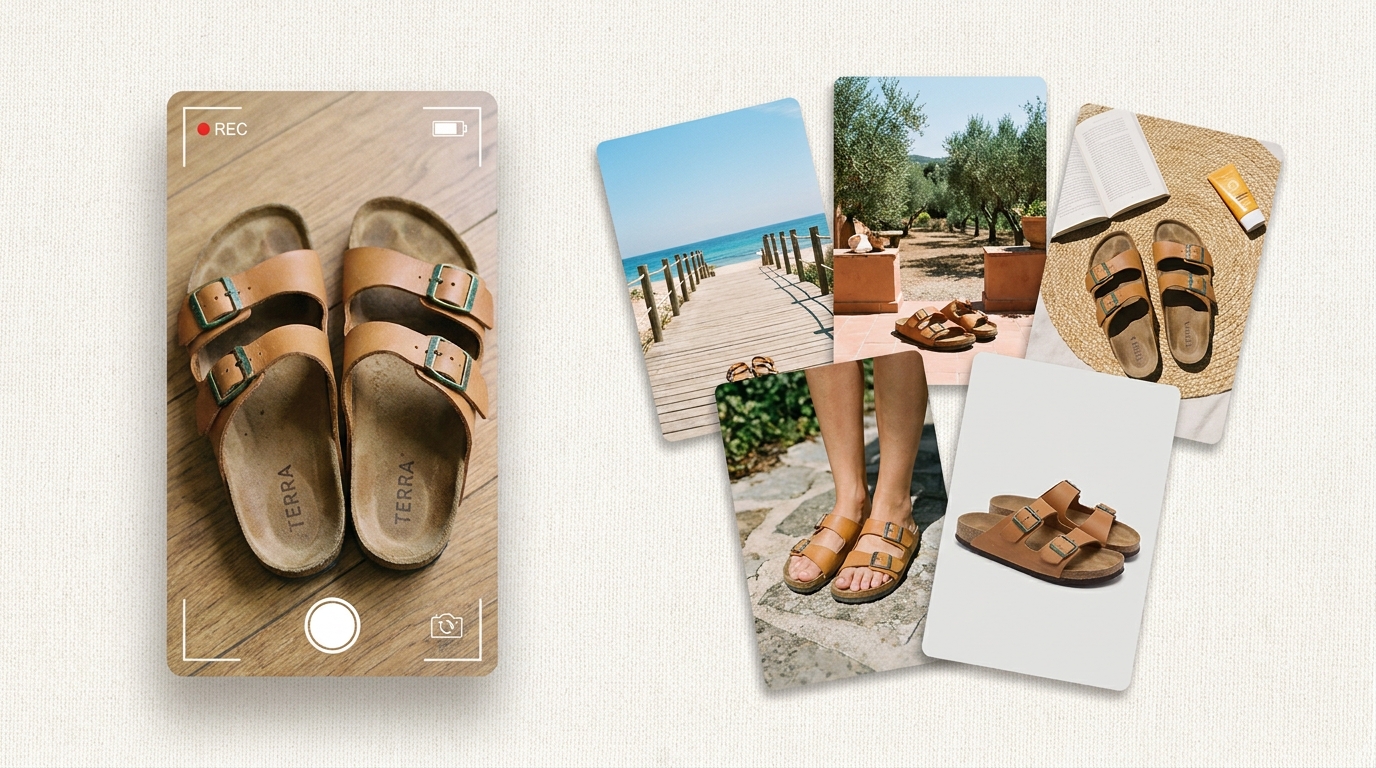
If you sell on more than one platform, you already know the headache. Amazon wants clean white backgrounds. Etsy rewards styled lifestyle shots. Instagram demands scroll-stopping visuals. Your own website needs brand-consistent imagery that tells a story. One set of product photos rarely works everywhere.
Most sellers either shoot once and reuse the same images across every channel — or they don't bother listing on platforms where their photos don't fit. Both cost you sales.
The smarter move is creating product photo variations from a single source image. One good photo of your product, multiple outputs tailored to where they'll actually be seen.
Why Each Sales Channel Needs Different Photos
This isn't about being picky. Each platform has different technical requirements, different buyer behavior, and different visual expectations. What converts on Amazon will underperform on Instagram, and vice versa.
Amazon is a comparison-shopping engine. Your main image must be on a pure white background (RGB 255, 255, 255) — Amazon enforces this and will suppress listings that don't comply. Secondary images should show multiple angles, infographics, and scale. Lifestyle shots help in the gallery, but the white cutout does the heavy lifting. See our guide to Amazon product photo requirements for the full breakdown.
Etsy is the opposite. Buyers come looking for personality — handmade, unique, curated. Styled lifestyle photos consistently outperform white backgrounds in Etsy search. The platform's 5:4 thumbnail crop means your hero image needs careful composition, and listings with all 10 image slots filled rank better. Etsy shoppers want to see your product in context. Check our Etsy product photography guide for specifics.
Instagram is where you're competing with everything — friends, memes, other brands. Product photos need to stop the scroll, which means lifestyle context, bold composition, and images sized correctly (4:5 portrait for maximum feed real estate). Flat lays, on-model shots, and seasonal scenes all perform well. A product floating on white gets scrolled past instantly.
Your own website (whether on Shopify or another platform) is where brand consistency matters most. You want a mix: clean product shots for the catalog grid, lifestyle images for the detail page, and aspirational scenes for the homepage. Your website is also where you can use wider aspect ratios and higher resolutions without platform constraints.
The point is simple: multi-channel product photography isn't a luxury — it's a requirement if you want each listing to perform at its best.
What Makes a Good Product Photo Variation
Not all variations are created equal. Useful product photo variations change the context, the story, or the use case.
Here are the types that actually matter for ecommerce:
- White/clean background — Your baseline. Required for Amazon and Google Shopping. Clean, professional, no distractions.
- Lifestyle scene — The product placed in a realistic environment. A pair of sandals on a sun-drenched boardwalk. A candle on a nightstand. This is what sells on Etsy, Instagram, and your website's hero sections.
- On-model shots — For wearable products, showing the item on a person is one of the strongest conversion drivers. Buyers want to see fit, scale, and how it looks in real life. On-model photography used to require hiring models and booking studios — that's no longer the only option.
- Flat lay / styled arrangement — The product arranged with complementary items. Sandals next to a straw hat and sunscreen. A watch beside a notebook and coffee. These work well for social media and email marketing because they tell a broader story.
- Seasonal or thematic — The same product in a summer setting vs. a holiday setting. Useful for running seasonal campaigns without reshooting.
A strong multi-channel strategy uses three to five of these variations per product. That sounds like a lot of photography — and it used to be. But it doesn't have to be anymore.
The Traditional Way vs. Generating Variations
Traditionally, creating product photo variations meant multiple photoshoots. White backgrounds for Amazon, a lifestyle set for your website, a model for Instagram, a styled flat lay for email. For a catalog of even 20 products, that's a serious investment in time and budget.
Many sellers skip this entirely. They shoot once — usually on white — and reuse those images everywhere. Their Amazon listings look fine, but their Etsy shop feels sterile, their Instagram feed looks like a catalog page, and their website lacks personality.
AI scene generation changes the math. Flyshot lets you upload a single product photo — even one taken with your phone — and generate multiple variations. The AI removes the background, then places your product into different scenes: a beach boardwalk, an olive grove, a styled flat lay, an on-model shot. Same product, different contexts, all from one source image.
This isn't about replacing professional photography for every use case. But for the majority of your catalog — the products that need solid, varied imagery across four or five channels — generating variations from a single photo is a practical way to get there without blowing your content budget.
A Practical Multi-Channel Workflow
Here's a workflow that covers the major channels without requiring multiple shoots per product:
Step 1: Capture one strong source photo. Use natural light, a clean surface, and your phone's highest resolution. Shoot straight-on or at a slight angle. Our phone photography guide covers how to nail this.
Step 2: Generate your variations. From that single image, create the set you need:
| Channel | Variation Type | Notes | | --------------- | ---------------------- | ------------------------------------------------------- | | Amazon | White background | Required — non-compliant listings get suppressed | | Etsy | Styled lifestyle scene | Listings with all 10 slots filled rank higher in search | | Instagram | On-model or flat lay | 4:5 portrait crops get ~30% more feed real estate | | Your website | Mix of all types | Hero + detail + lifestyle covers the full buyer journey | | Email campaigns | Seasonal scene | Swap scenes quarterly without reshooting anything |
Step 3: Resize and export for each platform. Amazon wants at least 1600px on the longest side. Instagram performs best at 1080x1350. Etsy thumbnails crop to 5:4. Export each variation at the right dimensions.
Step 4: Maintain consistency. When you find a scene style that fits your brand, apply it across your catalog. Consistency builds trust — whether someone finds you on Amazon or Instagram first, your product should feel like it belongs to the same brand.
Stop Reusing the Same Photo Everywhere
The sellers who stand out on multiple platforms aren't the ones with the biggest photography budgets. They're the ones who tailor their product photos to each channel instead of reusing the same image everywhere.
You don't need a studio or a week of photoshoots. You need one good photo and a way to turn it into the variations each platform demands. Try Flyshot free — upload a product photo and generate your first set of channel-ready variations in minutes. Then put them where they belong and watch what happens to your click-through rates.